Buffalo Bills Mobile
4.3 2.85K Reviews
Analysis By AppCompare
If you follow the Buffalo Bills, Buffalo Bills Mobile is best understood as a team companion rather than a general sports app. I installed it expecting a quick way to stay connected with the Bills, and that is the right mindset: it puts the official team experience in one place, but it is not meant to replace every sports service you already use. The app is free, carries an Everyone age rating, and comes from YinzCam, Inc., a developer known for building official team mobile experiences.
My first impression was that the app makes sense for fans who want team-specific information without sorting through a crowded league-wide feed. If your attention is focused on Buffalo, that narrower approach is useful. You are not opening it to follow several unrelated teams or compare every game in a competition. You are opening it because the Bills are the team you want to check first.
The app has been available since September 7, 2011, and its current version is 3.7.2. That long presence matters in a practical way: this is not a temporary fan project or a generic sports dashboard with a team name placed on top. It is an established official app, with more than 100 thousand installs and an average rating of 4.3 from roughly 9.9 thousand ratings. Those figures suggest a solid audience, although they should not be mistaken for a promise that every phone or every update will feel identical.
What to expect before you open it
The most important expectation to set is that this is a focused Buffalo Bills app. The store summary calls it the official app of the team, and that official connection is its main reason to exist. I would choose it over a general sports app when I want the Bills presented as the primary subject instead of being one tile among dozens of teams.
That focus also explains its limits. A broad sports service may be better if you want extensive coverage of many leagues, detailed comparisons across teams, or one universal place for every score you follow. Buffalo Bills Mobile is more personal and direct. It is for the fan who thinks, “What is happening with Buffalo?” before asking about the rest of the sports world.
On a normal day, I would use it in short visits rather than leave it open constantly. A quick check before work, another look during a break, or a glance before a game can be more useful than treating it as a full-time information stream. That habit keeps the app in its strongest role: a team-centered shortcut.
On game day, the value becomes clearer. Imagine that I am away from the television and only have a few seconds to check the Bills. I do not want to search the web, dismiss unrelated headlines, and work out which result is current. I want to open the official team app and begin from Buffalo’s own space. That small reduction in friction is the real everyday benefit.
Still, I would not install it expecting the same depth as a specialist statistics service. Fans who care most about advanced historical analysis, large league-wide databases, or highly customizable tracking may prefer a general sports platform. The Bills app complements those tools well, but it does not need to replace them.
Getting through the first setup
The app supports Android devices running version 10 or later, so I would check the operating system before downloading it. That is especially important on an older phone: the app is free, but compatibility is still part of the decision. On a supported device, the sensible approach is to install it, open it, and give yourself a moment to understand the team-focused layout before searching for every possible option.
I recommend starting with one simple goal. Decide whether you want a quick team update, a game-related check, or a general look around. New users often make the first launch harder by trying to inspect every section immediately. With this app, a short exploratory visit is more productive than treating setup like a complicated account-building exercise.
Pay attention to the difference between information that belongs to the team and information that comes from your phone or other services. If the app asks you to make choices about alerts or preferences, consider how often you really want to be interrupted. A fan who wants only occasional updates should avoid enabling every possible notification simply because it is available.
That is one of my practical tips: begin with the least noisy arrangement, then add what you miss. It is easier to recognize which updates matter after using the app for a few days. If I turn on everything at the start, an important message can become less noticeable because it arrives beside too many ordinary alerts.
Another useful habit is to open the app once on a quiet day, not only when a game is already underway. That gives you time to learn where the main team information lives. When you are watching a game or following it from elsewhere, you will then spend less time navigating and more time getting the update you came for.
Finding the first meaningful result
Your first successful action should be small and concrete: open the app, locate the current Bills information, and return to it later without needing to search again. That may sound basic, but it is the best test of whether the app fits your routine. If the path feels natural, the app has already earned a place on your phone.
I would test it in three situations. First, open it when you have no urgent reason to do so and see whether the main screen immediately tells you where to begin. Second, close it and return after some time to check whether you can find the same kind of information quickly. Third, use it during a busy moment, such as a work break, when you have only enough attention for a short visit.
The third test is particularly revealing. An official team app should save me from unnecessary searching. If I can open Buffalo Bills Mobile, recognize the team context, and reach the information I want in a few taps, it succeeds even if I continue using another service for deeper details.
A realistic routine might look like this: I leave home without time to follow the Bills closely, then check the app during lunch. I use the team-focused screen to catch up, close it, and return later when I have more time. In the evening, I may use a broader sports app for other results, while keeping this one for Buffalo-specific updates. That split is not a weakness; it is often the most comfortable way to use it.
My second non-obvious tip is to judge the app by repeatability, not by the excitement of the first launch. Official sports apps can look impressive when opened for the first time, but the real question is whether the same route remains easy when you are distracted. If the app becomes your dependable two-minute check-in, it is doing its job.
I also suggest keeping the app available even if you normally follow games on television or through another service. The official team perspective can be a useful companion when a general score app gives you only a result. You do not have to choose one source for everything.
Where new users can get confused
The most common confusion is assuming that an official app must be a complete replacement for every other sports tool. It is not. The word “official” tells me that the app is centered on the Buffalo Bills; it does not mean that it will be the best place for every league, every statistic, or every kind of fan customization.
A second source of friction is expecting the experience to be identical on every device. The minimum operating system is Android 10, and phones differ in screen size, performance, notification handling, and background behavior. If the app feels slower or alerts appear differently from what a friend describes, that may be a device-level difference rather than a problem with the team content itself.
There is also a difference between reading team information and receiving it automatically. Some people want to open an app only when they choose. Others want their phone to announce every important development. I would not assume that one setting suits both groups. Start quietly, then adjust based on your actual routine.
My third practical tip is to separate “I need this now” from “I might want this later.” Keep immediate updates easy to reach, but do not let optional material crowd your daily use. This is especially helpful during a busy sports period, when a fan can quickly accumulate more notifications and reading choices than they can realistically follow.
Another point worth remembering is that a team app can be emotionally more satisfying than a neutral score service, but emotional connection does not automatically equal technical depth. If I want a fast Bills check, the official app is a natural choice. If I want to compare several teams, examine long-term numbers, or manage a wide list of sports interests, I would switch to a general alternative instead of forcing this app to do a job it was not designed to handle.
The rating of 4.3, based on about 2.8 thousand written reviews, gives the app a reassuring public track record, but I still read that kind of figure carefully. Ratings reflect different phones, expectations, and habits. A person seeking only official Buffalo coverage may be very happy, while someone expecting a universal sports command center may feel restricted.
Who will get the most from it
I would recommend Buffalo Bills Mobile to a Bills supporter who wants a dedicated starting point on Android or iOS rather than a general feed. It is also a sensible choice for someone who follows the team casually but wants an official place to check in before deciding whether to spend more time on a game or story.
It can suit families as well. Because the content rating is Everyone, the app is positioned for a broad audience rather than a mature-only group. A parent and child who both follow Buffalo can use the same team-centered app without needing a complicated sports setup. The useful part here is simplicity: the team identity is clear, so a new fan does not have to understand a large sports platform first.
It is less suitable for a person who does not follow the Bills specifically. If your interest changes from team to team, a league-wide app will probably be more efficient. I would also skip it as a primary sports tool if your main requirement is detailed analysis across many competitions. Installing it alongside another app can make sense, but using it alone may leave gaps.
Price is another reason it is easy to try: the app is free. That lowers the risk of testing it for a week and deciding whether its official focus fits your habits. Free does not mean frictionless, though. Your time, notifications, device compatibility, and tolerance for switching between apps still matter more than the download cost.
How it compares with the usual alternatives
Compared with a general sports-score app, Buffalo Bills Mobile offers a more concentrated experience. A broad service wins when I need many teams, competitions, or customizable scoreboards in one place. The Bills app wins when I want to remove that extra layer and begin with Buffalo.
Compared with social media, the app gives me a more deliberate destination. Social feeds can be fast and lively, but they also mix opinions, unrelated posts, and algorithmic choices. An official team app is easier to approach when I want team information without first sorting through a personal timeline. Social media may still be better for conversation and fan reaction.
Compared with a mobile browser, the app provides a repeatable route. I do not need to remember a search phrase or decide which result looks official each time. The trade-off is that a browser is more flexible for researching several teams or sources at once. I use the app for the Bills and the browser when my question becomes broader.
This comparison leads to my clearest recommendation: do not ask whether it is the best sports app in general. Ask whether it is the best first stop for Buffalo Bills information. For that narrower question, its official identity and focused design are meaningful advantages.
Making the app part of a useful routine
After the first successful check, I would build a routine around moments when the app can save time. Open it before a game to orient yourself, use it during a short break when you want a team-specific update, and return afterward when you want to reconnect with Buffalo. These small visits are more realistic than expecting the app to become an all-day destination.
If you already use a general sports service, keep both apps only if they serve different purposes. Let the broader service handle the full sports picture and use Buffalo Bills Mobile for the team-first view. If you find yourself opening both apps for exactly the same information every time, choose the one that feels faster and less distracting for your habits.
Keep your expectations current as well. The installed version is 3.7.2, and app behavior can change with updates, device software, or team-season context. I would pay attention to how the current build fits your phone rather than relying only on someone else’s older experience.
One final workflow tip is to use the app as a starting point for questions, not necessarily the ending point for every question. It can reconnect me with the Bills quickly; then, if I need wider context, I can move to a specialist source. That approach avoids disappointment and makes the official app more useful because I am giving it a clear job.
After spending time with it, I see Buffalo Bills Mobile as a practical, low-risk download for the team’s supporters. It is free, broadly accessible, and focused enough to make Buffalo the center of the experience. Its main limitation is also its defining feature: it is not designed to be everything for every sports fan.
If you want a dependable official starting point for the Bills, I think it is worth trying. Install it on a supported device, begin with a quiet tour, find the team information you care about, and keep notifications restrained until you know what helps. The best result is a simple routine: open the app, reach Buffalo quickly, and leave with the update you actually wanted.
FAQ
What is Buffalo Bills Mobile, and what can I do with it?
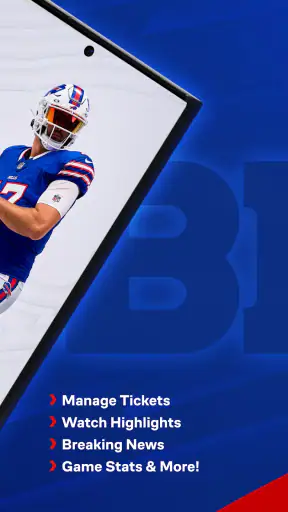
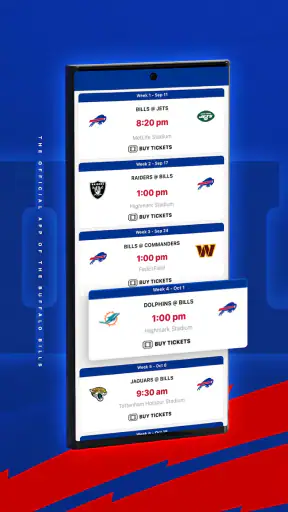
Buffalo Bills Mobile is the official app for following the Buffalo Bills on Android and iOS. After installing it, fans can typically check team news, schedules, scores, standings, rosters, player information, videos, and official announcements. It may also provide game-day coverage, ticketing tools, stadium information, promotions, and links to team merchandise, making it a convenient companion for supporters throughout the NFL season.
Does Buffalo Bills Mobile provide live game scores and updates?
Yes, the app is designed to keep fans informed during games with live scores, schedules, standings, play-by-play information, and important team updates. The exact features can depend on your location, device, internet connection, and NFL broadcasting restrictions. It should not automatically be considered a replacement for a live television or streaming subscription, especially when watching full games is subject to regional availability.
Can I use the app to buy Buffalo Bills tickets or access my tickets?
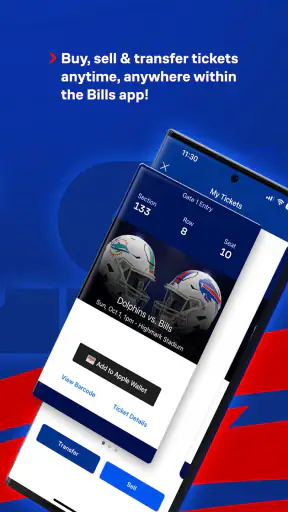
Buffalo Bills Mobile may include official ticketing features, such as links to purchase tickets, manage an account, view event details, or access mobile tickets for games at Highmark Stadium. Availability can vary depending on the event and the ticket provider. Before relying on the app at the stadium, sign in beforehand, keep your tickets loaded, and make sure your phone has sufficient battery and a stable connection.
Does Buffalo Bills Mobile require an account, and is it free to download?
The app is generally free to download, although some connected services, purchases, tickets, merchandise, or premium content may involve additional costs. You can often browse basic news and team information without creating an account, while ticket management, personalized alerts, purchases, or loyalty features may require sign-in. Review the permissions, privacy policy, and account requirements shown in the official app store before installing.
What should I do if Buffalo Bills Mobile is not working properly?
If the app crashes, fails to load scores, or does not display tickets correctly, first check your internet connection and confirm that the application is updated through Google Play or the App Store. Restarting the app or device may also help. For ticket problems, use the official ticket provider’s support channel as well. Avoid deleting the app before confirming that your account credentials and mobile tickets are safely available.
Pros
- Official source for Buffalo Bills news
- scores
- and team updates
- Live game information helps fans follow matches while away from TV
- Roster and player details are convenient to access in one place
- Team content and videos create a more engaging fan experience
- Useful for checking schedules
- tickets
- and other game-day information
Cons
- Some features may depend on location
- event timing
- or season availability
- Frequent notifications can feel excessive unless carefully customized
- Video and live content may consume significant mobile data
- The app is mainly useful to Bills fans
- limiting its broader appeal
- Performance and loading times may vary with network quality